How to set up the AI phone receptionist
When you cannot pick up, the receptionist answers, tells the caller it is an AI, takes a message, and captures them as a lead, so a missed call does not become a lost customer. It captures the call; it never books. Here is how to set it up.
Set it up in three parts:
Step by step
Turn it on, set it up, let it answer
- 1
Turn it on
The receptionist is a paid add-on to your PoolBeacon plan, so you need an active plan first. It is $19.99 a month with 120 answered minutes included, then 20¢ a minute after that (prepaid minutes that roll over). Because it answers real calls on a paid phone service, it is billed immediately rather than after your software trial. Turn it on from Settings, AI receptionist.

A paid add-on: $19.99/mo with 120 minutes included, 20¢/min after. Billed immediately. - 2
Get your receptionist number
Click Get your receptionist number. Pick an area code or let us assign one, and a dedicated number is provisioned for your assistant, nothing to set up with a phone company. Publish that number as your business line, or keep your current number and forward it to the receptionist when you cannot pick up.

Get a dedicated number in a couple of minutes, or forward your existing line to it. - 3
Tell it about your business
Fill in your work days and hours, your service area, the services you offer (with optional starting prices), and an FAQ. The assistant answers callers using only what you put here, so it never invents a price or a fact it was not given. A live "What callers will hear" preview shows the exact greeting, and you can turn on Spanish so it greets and answers in the caller's language.
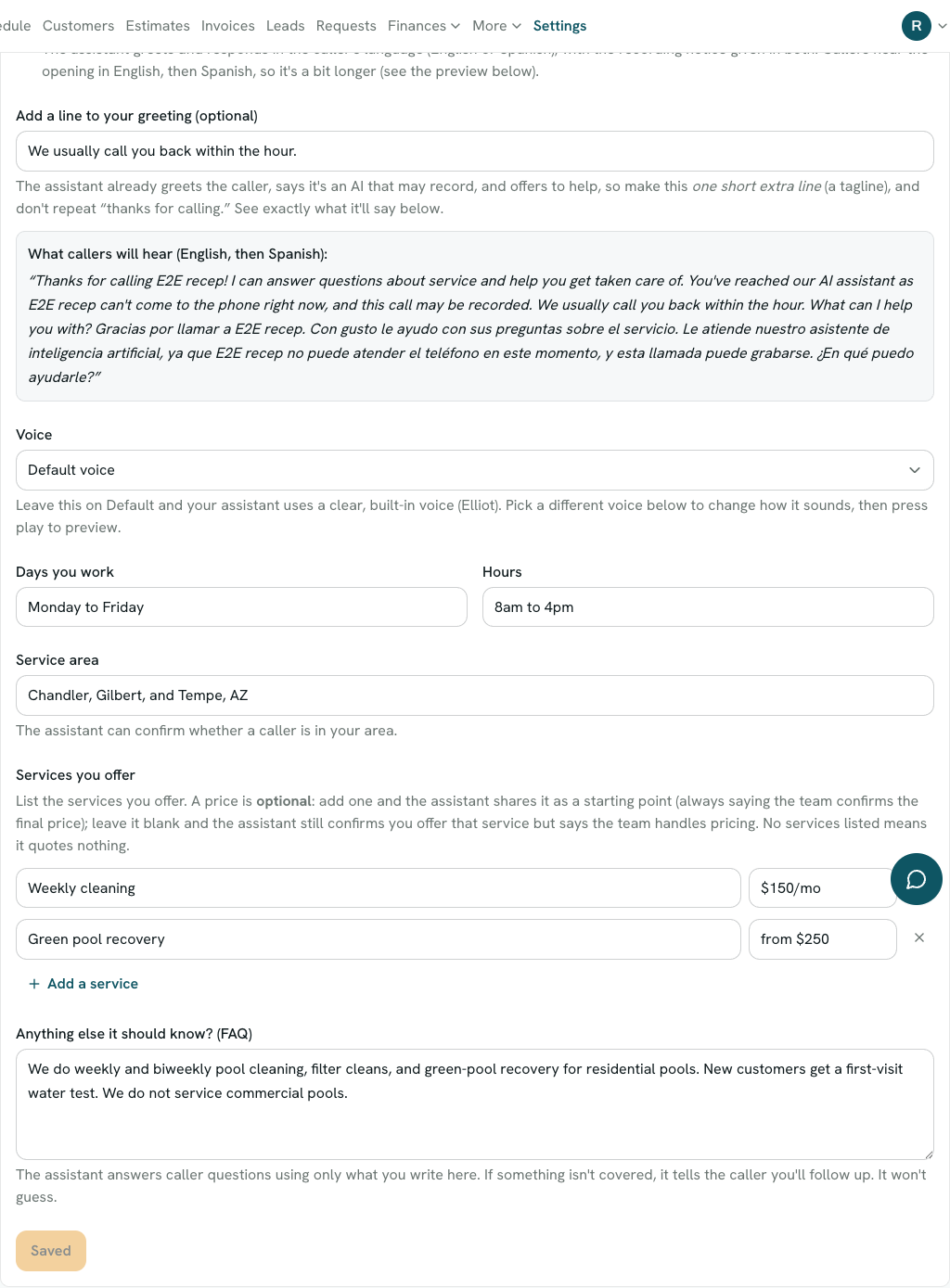
It only says what you tell it. The preview shows the exact greeting, including the AI and recording notice it opens with. - 4
It captures the call, you follow up
On a call, the assistant greets the caller, tells them up front that it is an AI and the call may be recorded, answers what it can from your settings, and takes their name, number, and message. It never books a time; it just tells the caller your team will follow up. Every answered call is logged under Recent calls with a summary, and a genuine new-customer call with a callback number becomes a lead in your Leads inbox, tagged as coming from the phone receptionist.
Good to know
What it does, and what it will not do
It captures, it does not book
The receptionist never promises a specific day or time. Its only commitment to a caller is that someone will follow up. That is deliberate: it keeps you from being on the hook for an appointment you did not agree to, and it is the safer legal posture for an automated line.
It only says what you tell it
Prices and facts come from your settings. If a caller asks something you have not covered, it says your team will follow up rather than guessing. You control exactly what it can share.
Callers always know it is an AI
The assistant states that it is an AI and that the call may be recorded in its opening line, and that disclosure cannot be turned off. It is spoken in Spanish too when you enable bilingual calls. This keeps you on the right side of AI-voice and call-recording rules.
You can block a number
A spam or robocall number that keeps ringing your line is answered minutes you paid for. Add it under Blocked callers in your receptionist settings and the assistant stops picking up for it. The caller is not told they are blocked, and nothing about the block is ever spoken on a call.
Questions about the receptionist
- Does the receptionist book appointments?
- No. It captures the caller as a lead and tells them your team will follow up. It never confirms a specific day or time. Booking stays with you.
- What does it cost?
- $19.99 a month, added to your PoolBeacon subscription, with 120 answered minutes included and 20¢ a minute after that. The extra minutes are prepaid and roll over. It is billed immediately rather than after the software trial, because it answers real calls on a paid service.
- Do callers know they are talking to an AI?
- Yes. It says it is an AI assistant and that the call may be recorded, right at the start, and that cannot be turned off.
- Where do the calls go?
- Every answered call is logged under Recent calls with a summary. A genuine new-customer call that leaves a callback number also becomes a lead in your Leads inbox, tagged as coming from the phone receptionist.
- A number keeps calling and wasting my minutes. Can I block it?
- Yes. Open your receptionist settings, add the number under Blocked callers, and save. The receptionist stops answering it, so it stops drawing down your minutes. You can unblock it again at any time.
- Can it handle Spanish-speaking callers?
- Yes. Turn on "Handle Spanish-speaking callers" and it greets and responds in the caller's language, with the AI and recording notice given in both.
- Do I need a PoolBeacon plan to use it?
- Yes. The receptionist is an add-on to an active PoolBeacon plan, not a standalone product.
Stop losing missed calls
The receptionist add-on answers when you cannot, for $19.99 a month with 120 minutes included. Start your PoolBeacon plan and turn it on when you are ready.